
Modern RAG-powered chatbots learn from your documents, website pages, and knowledge base to answer customer questions accurately — no training data preparation or machine learning expertise required. You provide the content, and the system handles the rest.
What does "training on your data" actually mean?
When people say "train a chatbot on your data," they usually mean one of two things:
- Fine-tuning — modifying the AI model itself with your data. This is expensive, slow, and usually unnecessary for customer support chatbots.
- RAG (Retrieval-Augmented Generation) — giving the AI access to your documents at query time so it can look up relevant information before answering. This is what modern chatbot platforms use.
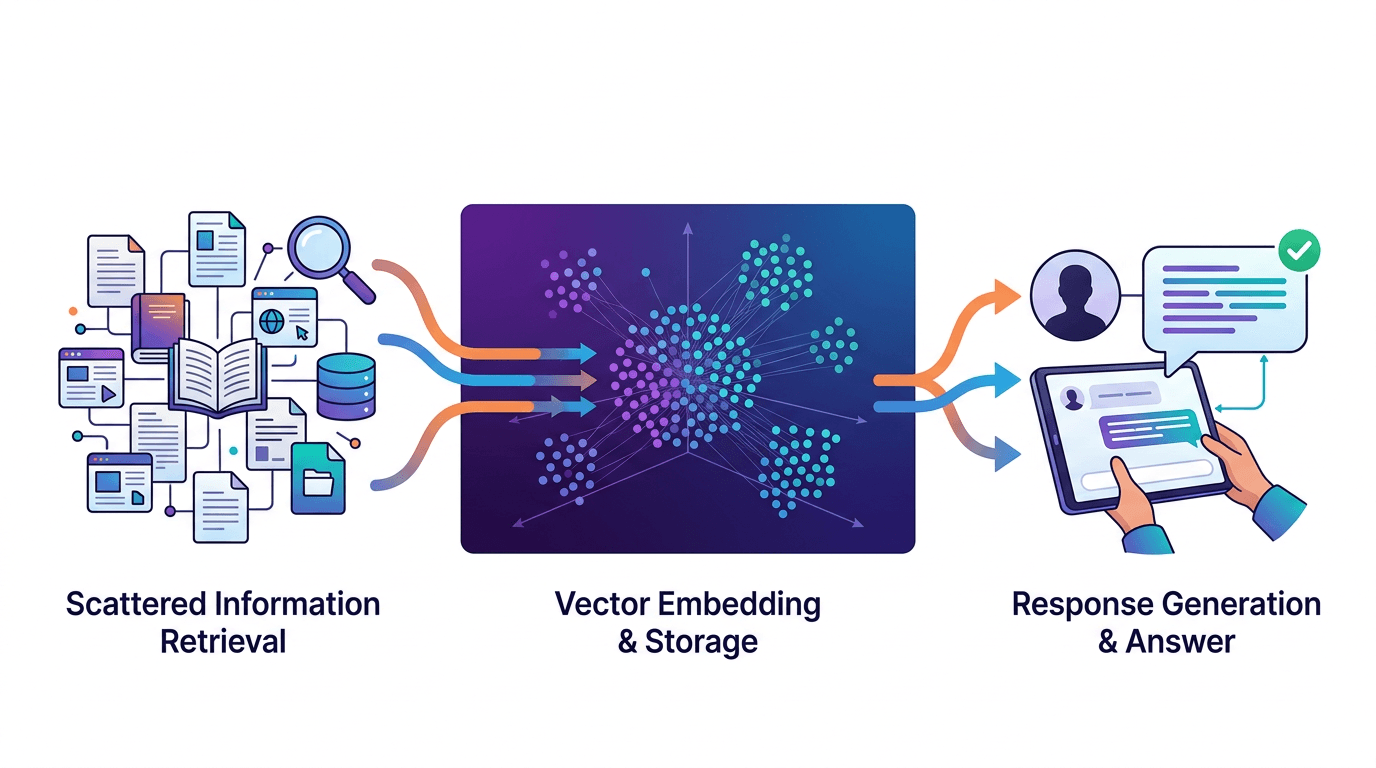
With RAG, the AI model stays the same. Your data is stored separately as searchable embeddings. When a customer asks a question, the system finds the most relevant chunks of your content and feeds them to the AI along with the question. The AI then crafts an answer based specifically on your information.
Pro tip
RAG is almost always the right choice for customer support chatbots. It's cheaper, faster to set up, and easier to keep up to date than fine-tuning. For a deeper dive, read our explainer on what RAG is and how it works.
How does RAG work?
The process happens in four steps, all handled automatically:
- Crawl and extract. The system visits your website pages (or reads your uploaded documents) and extracts the text content.
- Chunk and embed. The text is split into manageable chunks (usually 200-500 tokens each) and converted into vector embeddings — numerical representations that capture the meaning of each chunk.
- Store and index. These embeddings are stored in a vector database where they can be searched by semantic similarity.
- Retrieve and generate. When a customer asks a question, the system converts their question to an embedding, finds the 3-5 most relevant chunks, and passes them to the LLM as context along with the question.
The result is an answer that's grounded in your actual content rather than the AI's general knowledge.
What types of data can you use?
Any text-based content works. Here's what most businesses start with:
- Website pages — product pages, about pages, FAQ pages, documentation, blog posts. The crawler handles these automatically.
- PDF documents — product manuals, whitepapers, terms of service, employee handbooks
- Text files and markdown — internal knowledge base articles, process documentation
- FAQ content — structured question-and-answer pairs work especially well because they match how customers naturally ask questions
Pro tip
Start with your FAQ page and top 10 support articles. These cover the questions customers actually ask most often. You can always add more content later.
Step-by-step: connecting your data sources
- Enter your website URL — the crawler will index all public pages automatically. This takes 30 seconds to 2 minutes depending on your site size.
- Upload additional documents — drag and drop PDFs, text files, or markdown documents into the dashboard. Each document is processed and indexed within seconds.
- Review the sources — check the dashboard to see which pages and documents were indexed. Remove any that shouldn't be included (like outdated content).
- Test with real questions — ask the chatbot questions your customers typically ask. Verify that it finds the right source content and generates accurate answers.
How to prevent hallucinations
Hallucination — when the AI generates plausible-sounding but incorrect information — is the biggest risk with any AI chatbot. Here's how to minimize it:
- Use RAG, not general knowledge. A RAG-powered chatbot only answers based on the documents you provide. If the answer isn't in your content, a well-configured bot will say "I don't have that information" instead of guessing.
- Write a clear system prompt. Include instructions like: "Only answer based on the provided context. If you're not sure, say you don't know and suggest contacting support."
- Keep content up to date. Outdated documents lead to outdated answers. Recrawl your site when you update pricing, policies, or product information.
- Enable content moderation. Set up guardrails so the chatbot stays on topic and doesn't venture into areas outside your business.
- Monitor conversations. Review chatbot conversations regularly to catch any patterns of incorrect answers.
When should you retrain?
"Retraining" with RAG is much simpler than with fine-tuned models. It just means recrawling your website or re-uploading updated documents. Here's a practical schedule:
- Immediately — after changing pricing, policies, product features, or contact information
- Weekly — if you publish new blog posts or update documentation frequently
- Monthly — as a baseline to catch any content changes you might have missed
You can set up automatic recrawling on a schedule so your chatbot always has your latest content. The recrawl process runs in the background and doesn't affect the live chatbot.
Frequently asked questions
Do I need machine learning experience to train a chatbot?
No. Modern RAG-powered chatbots handle embedding, indexing, and retrieval automatically. You just provide your content — the platform does the rest.
What types of data can I use?
Website pages, PDF documents, text files, knowledge base articles, and FAQ content. Any text-based content that answers your customers' questions works well.
How do I prevent my chatbot from hallucinating?
Use RAG to ground responses in your actual data. Configure your system prompt to instruct the AI to only answer based on provided context and to say "I don't know" when it can't find relevant information.
How often should I update my chatbot's data?
Recrawl after major content changes. For most businesses, weekly or bi-weekly recrawling keeps the chatbot current. You can also automate this on a schedule.
The best part about RAG-based chatbots is that they get more useful as you add more content. Start with your most common support questions, see the results, and expand from there. Check out the full feature list to see how rentabot.chat makes this process simple.