RAG (Retrieval-Augmented Generation) is a technique that feeds relevant documents to an AI model at query time, so it answers from your actual content instead of making things up. It is the core technology behind chatbots that can accurately answer questions about your specific business, products, or documentation.
How does RAG work?
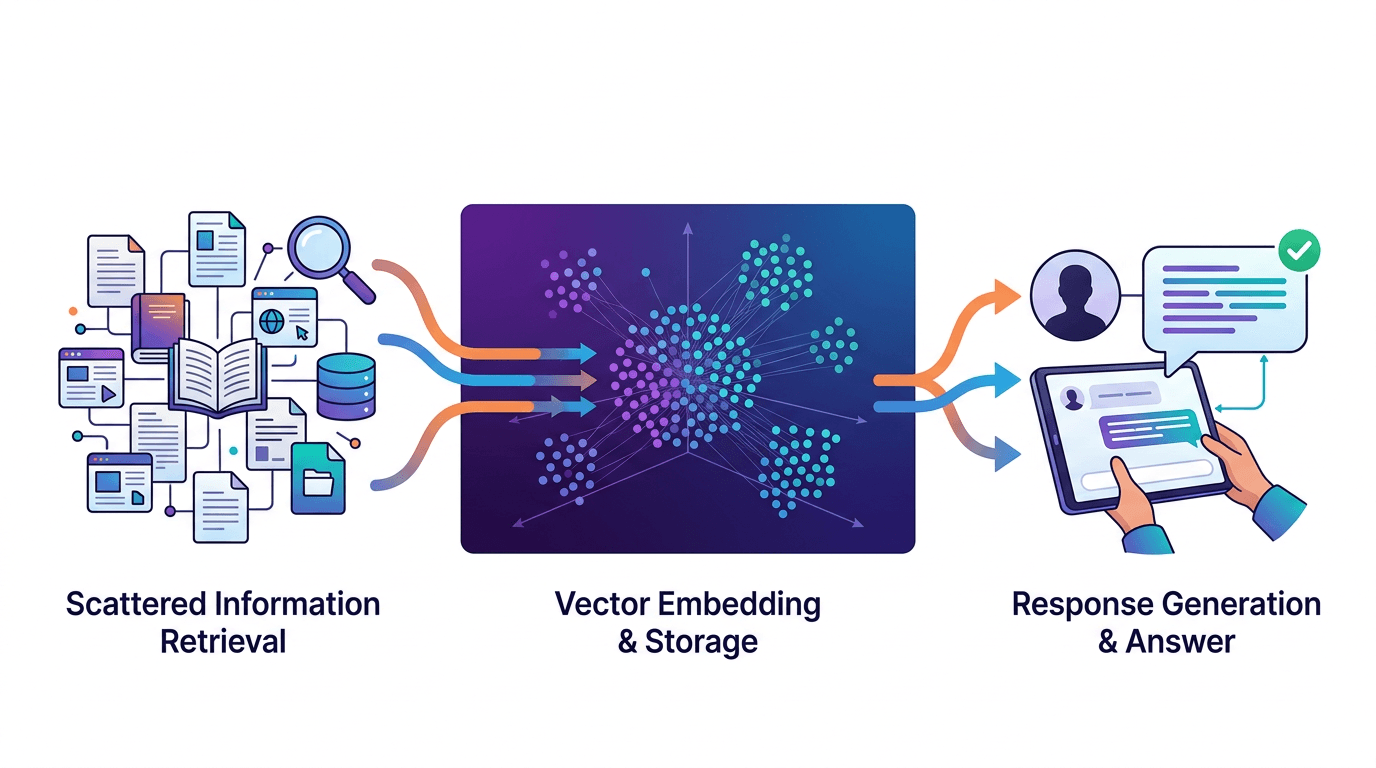
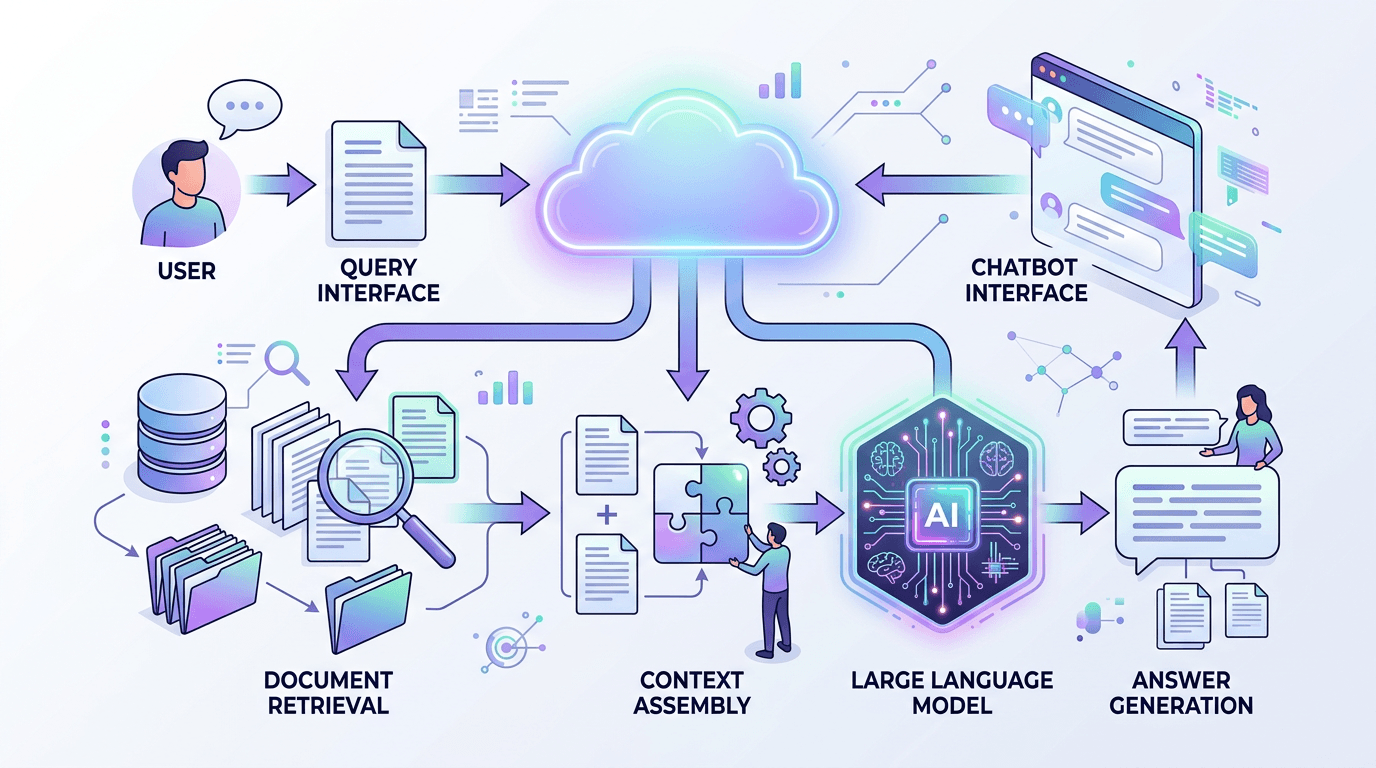
RAG follows a three-step process every time a user asks a question. Understanding these steps demystifies why RAG-powered chatbots are so much more accurate than plain LLMs.
- Embed: Your documents (website pages, PDFs, help articles) are converted into numerical vectors called embeddings. Each embedding captures the meaning of a chunk of text. This happens once, when you first upload or crawl your content.
- Retrieve: When a user asks a question, their query is also converted into an embedding. The system finds the most semantically similar document chunks using vector search — not keyword matching, but meaning matching.
- Generate: The retrieved chunks are inserted into the LLM's prompt as context. The model generates a response grounded in your actual content, not its training data.
Pro tip
The quality of your RAG system depends heavily on step 1. Well-structured, clearly written documents produce better embeddings and better answers. Garbage in, garbage out applies to AI just as much as traditional software.
RAG vs fine-tuning — what's the difference?
These two techniques solve different problems. Here is how they compare:
| Aspect | RAG | Fine-tuning |
|---|---|---|
| What it changes | What the model knows (context) | How the model behaves (weights) |
| Setup time | Minutes to hours | Hours to days |
| Cost | Low (embedding + storage) | High (GPU training) |
| Content updates | Instant (re-embed changed docs) | Requires retraining |
| Accuracy on your data | High (cites actual documents) | Medium (can still hallucinate) |
| Best for | Knowledge bases, FAQ, support | Tone, format, specialized tasks |
For chatbot use cases — answering questions about your products, policies, and documentation — RAG is almost always the right choice. Fine-tuning makes sense when you need the model to write in a very specific style or handle specialized formats. Read our guide on training a chatbot on your own data for a hands-on walkthrough.
Why does RAG prevent hallucinations?
Without RAG, an LLM answers from its training data — a snapshot of the internet from months or years ago. It has no knowledge of your company, your products, or your policies. When asked a specific question it cannot answer, it guesses. That guess is a hallucination.
RAG changes the equation. Instead of guessing, the model receives the relevant section of your documentation right in its prompt. The instruction becomes: "Answer this question using only the following context." The model generates a response grounded in facts you control.
Studies show RAG reduces hallucination rates from roughly 15-25% (base LLM) to 2-5% (RAG-augmented), depending on document quality and retrieval accuracy.
RAG is not foolproof
The model can still misinterpret retrieved content or combine information incorrectly. Pair RAG with content moderation for an additional safety layer.
The role of embeddings and vector search
Embeddings are the secret ingredient that makes RAG work. Think of an embedding as a coordinate in a high-dimensional space where similar meanings cluster together.
When you embed the phrase "What are your return policies?" and your document contains a section titled "Refund and Exchange Guidelines," these two texts end up close together in embedding space — even though they share zero keywords. This is semantic search, and it is far more powerful than traditional keyword matching.
The embedding process works like this:
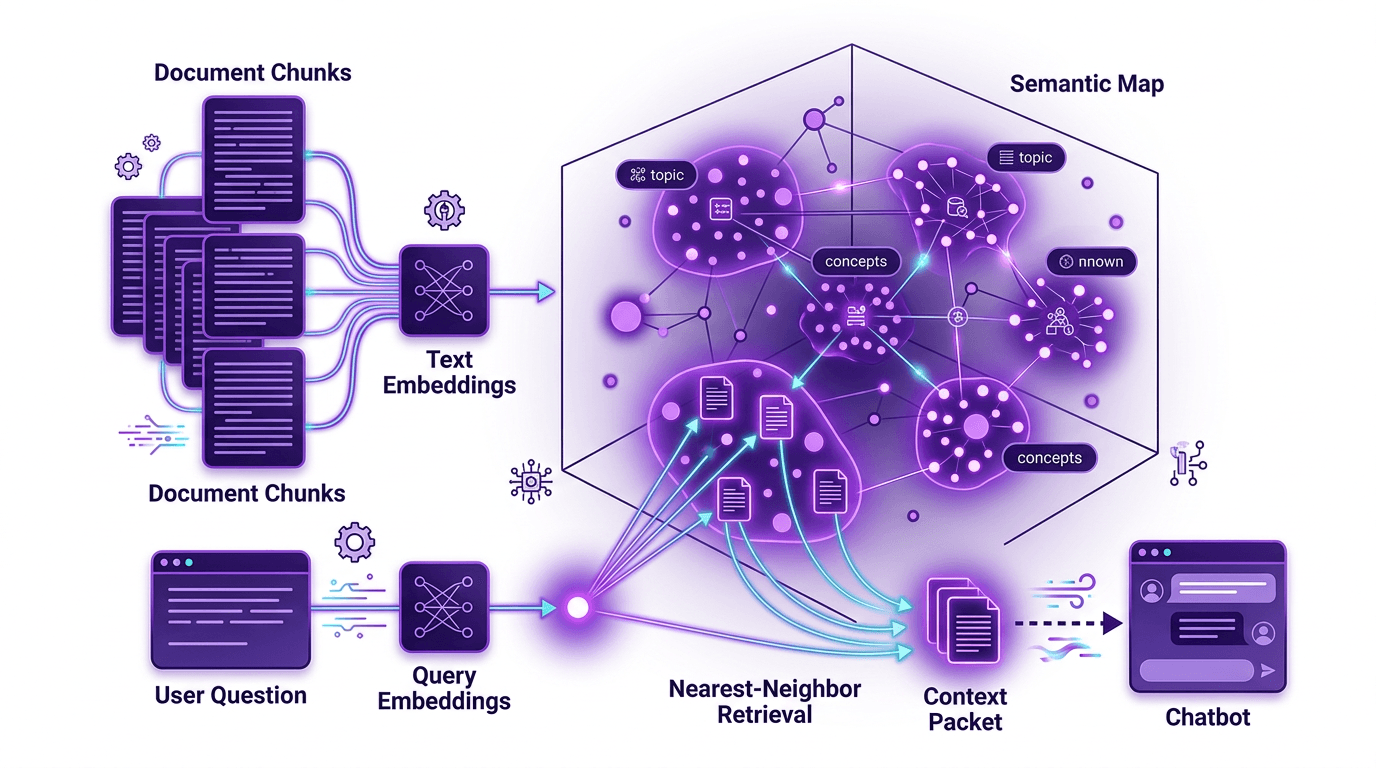
- Your content is split into chunks (typically 200-500 tokens each)
- Each chunk is converted to a vector (a list of 1,536 numbers for OpenAI's model)
- Vectors are stored in a database with fast similarity search
- At query time, the user's question is embedded and compared against all chunks
- The top 3-5 most relevant chunks are returned
What types of documents work with RAG?
RAG works with any text-based content. The most common sources for chatbots include:
- Website pages — automatically crawled and indexed
- PDF documents — product manuals, legal docs, white papers
- Help center articles — FAQ pages, knowledge base entries
- Markdown files — technical documentation, wikis
- Plain text — any unstructured text content
Content that does not work well with RAG: images without alt text, heavily formatted spreadsheets, and content that relies on visual layout to convey meaning (like infographics or complex diagrams).
Pro tip
Structure your documents with clear headings, short paragraphs, and explicit question-answer pairs. The clearer your source content, the better your chatbot's answers will be.
Limitations of RAG (and how to work around them)
RAG is powerful but not perfect. Understanding its limitations helps you build a better chatbot:
- Retrieval quality depends on document quality. If your docs are outdated, vague, or contradictory, the chatbot's answers will reflect that. Solution: audit your content regularly and keep it current.
- Chunk boundaries can split context. If a critical piece of information spans two chunks, the retriever might only find one half. Solution: use overlapping chunks with 10-20% overlap between segments.
- Embedding models have blind spots. Highly technical jargon, acronyms, or domain-specific language may not embed accurately. Solution: include definitions and expanded forms in your documents.
- The context window has limits. You can only feed so many retrieved chunks to the model. Solution: prioritize quality over quantity — 3 highly relevant chunks beat 10 marginally relevant ones.
FAQ
Do I need technical skills to set up RAG?
Not with a managed platform. With rentabot.chat, you point the crawler at your website, upload any additional documents, and RAG is configured automatically. No code, no vector database setup, no embedding pipeline to manage.
How often should I update my RAG knowledge base?
Re-crawl your website whenever content changes significantly — weekly is a good cadence for most businesses. For documents that change frequently (like pricing or availability), set up automatic re-indexing.
Can RAG work with self-hosted models?
Absolutely. The retrieval and embedding steps are independent of the generation model. You can use OpenAI embeddings with a self-hosted Ollama model for generation, or run the entire pipeline on-premise. See our self-hosted AI chatbot guide for details.
RAG is the foundation of accurate, trustworthy AI chatbots. Learn how to train a chatbot on your own data, or explore rentabot.chat features to see RAG in action.