
White-label AI chatbot for agencies
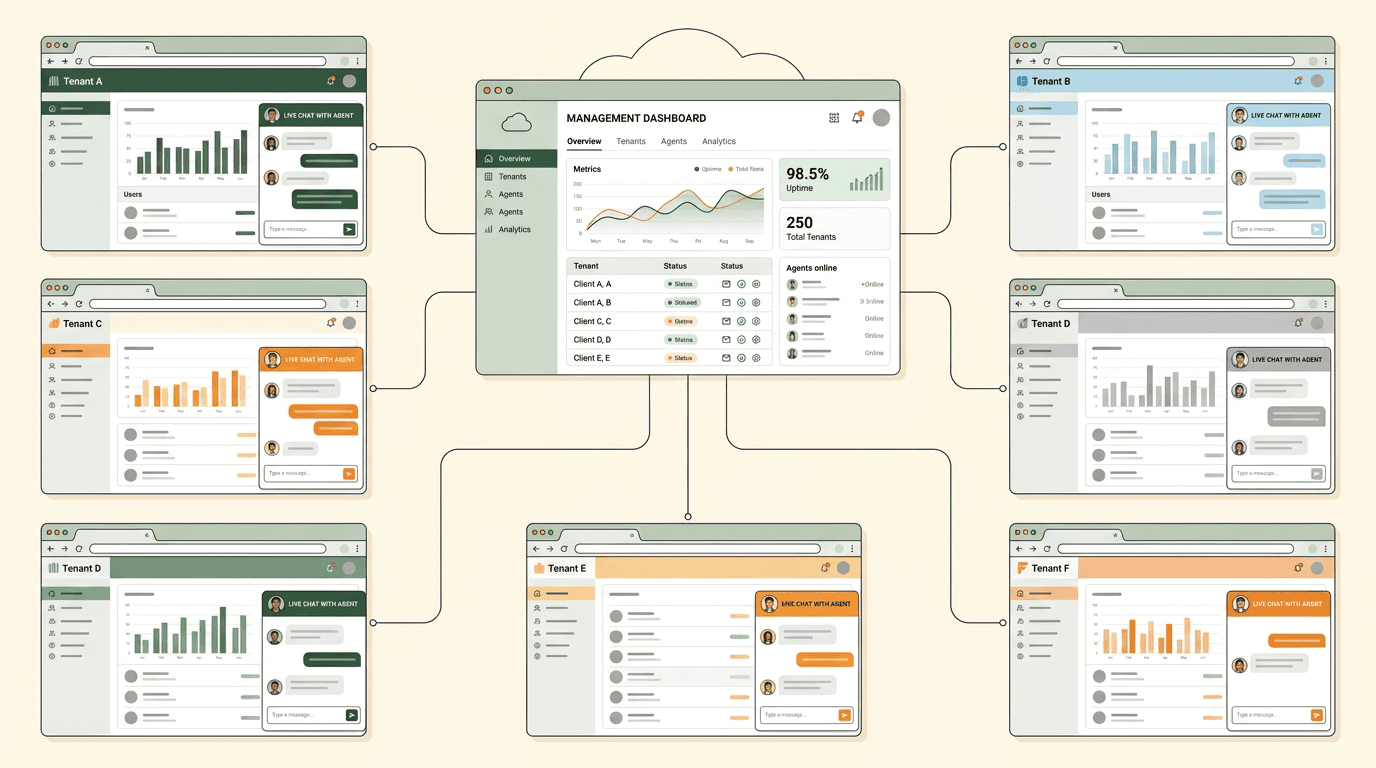
Resell AI chatbots under your own brand. Each client gets an isolated tenant with separate configuration, content, and analytics — all managed from a single dashboard.
for exactly this use case
Why do agencies choose rentabot.chat?
Most chatbot platforms are built for single businesses. rentabot.chat is built for the agency model from day one.
Built for multi-tenant
This isn't a single-tenant product with a multi-tenant wrapper bolted on. Row-level security, per-tenant LLM configs, and isolated data stores are core architecture — not afterthoughts.
Your brand, not ours
Your clients see your agency's branding on the widget. Custom colors, avatars, and greeting messages per client. rentabot.chat stays invisible to the end user.
Margin-friendly pricing
Per-tenant usage tracking makes it simple to calculate your margin. Charge clients what the market bears and track your cost per tenant in the dashboard.
How does multi-tenant isolation work?
Each client is a completely separate tenant. Here's what that means in practice.
When you create a new client in rentabot.chat, a new tenant is provisioned with its own isolated environment. Row-level security at the PostgreSQL level means one client's conversations, documents, and configurations are physically inaccessible to any other tenant — even if someone compromises an API key.
Each tenant gets independent settings: their own LLM provider and model, their own API keys (SHA-256 hashed), their own moderation rules, their own webhook endpoints, and their own crawled content. Changing one client's configuration never affects another.
You manage all of it from a single dashboard view. Filter by client, compare usage across tenants, and configure everything without switching accounts.

What can you offer your clients?
Every feature in the platform is configurable per tenant — giving you a rich service catalog.
Widget customization
Custom colors, position, avatar, greeting, and toggle image per client. Match their brand perfectly without any CSS workarounds.
Dedicated analytics
Per-client conversation volume, resolution rates, popular questions, and token usage. Export reports for client presentations.
Webhook integrations
Connect each client's chatbot to their existing tools — CRM, helpdesk, Slack, email. Different webhooks per tenant, fully isolated.
Custom tools
Define per-client function calling tools so each chatbot can interact with that client's specific APIs and data sources.
Per-client LLM config
Choose the right model and provider for each client — GPT-4o for premium clients, a lighter model for cost-sensitive ones, Ollama for privacy-focused clients.
Moderation per client
Set content moderation rules per tenant. A healthcare client gets strict medical guardrails while an e-commerce client gets product-focused rules.
How does agency pricing work?
Simple per-tenant economics that make margin calculation straightforward.
You manage all clients from one agency account. Each client is a separate tenant with its own usage tracking — conversation count, token consumption, and API calls are all metered per tenant.
This gives you full visibility into your cost per client. Set your own prices, build packages around conversation volume or feature tiers, and know your margin on every account.
Volume discounts apply as you add more tenants. Check our pricing page for current rates, or read about multi-LLM strategies to optimize costs across providers.
What security do your clients expect?
When you resell a product, its security posture reflects on your agency. These controls have you covered.
RLS isolation
PostgreSQL row-level security ensures one client's data is inaccessible to any other tenant — even in the event of an application-level bug.
Encrypted credentials
Every client's API keys and LLM credentials are encrypted with AES-256-GCM. Keys are SHA-256 hashed — even database access doesn't expose secrets.
Audit trail
Every configuration change across all tenants is logged. Show clients exactly who changed what and when — useful for regulated industries.
See all platform features including security, analytics, and customization options.
How do you get started as an agency?
From sign-up to your first client chatbot in three steps.
Create your agency account
Sign up and you immediately get a dashboard where you can create and manage tenants. No special agency application — multi-tenant is the default.
Add your first client
Create a tenant, crawl their website, configure the chatbot personality and moderation rules, and customize the widget to match their brand.
Embed and deliver
Give your client a single script tag. Their chatbot goes live immediately. Monitor performance and iterate from your dashboard.
Ready to add AI chat to your website?
Set up in 5 minutes. No credit card required. 14-day free trial.
Start free trial